Check out the video:
Work, learn and create with the printer that prints everything so you can tackle anything – from high-quality photos to documents. Choose HP+ and get the smart printing system that keeps you connected and ready to print from virtually anywhere.[1]
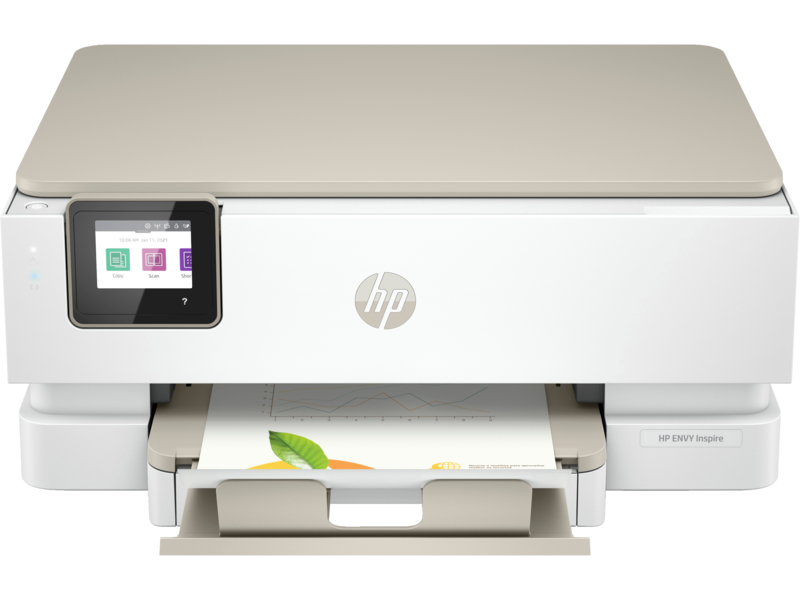
Built for Balancing it All
Experience a truly multipurpose home printer. With automatic two-sided printing and a built-in photo tray you and your family can create stunning photos and documents whenever you need them – from any device – quickly and easily with the HP Smart app. [3]
Memories Made Modern
Bring your photos to life with vibrant, true-to-phone quality [4], customise them with two-sided 10x15 cm (4x6") printing, and print in a variety of traditional and modern sizes including square and panoramic- all through the best-in-class HP Smart app. [3]
HP+: Smart Printing has Arrived
HP+ , the smart printing system that thinks ahead so your printer is ready when you are, more secure and productive than ever.
Dedicated Photo Tray for Seamless Printing
A built-in photo tray delivers convenient photo printing in a variety of sizes.
Automatic Two-sided Printing
Save time and paper when printing everyday and business documents with automatic two-sided printing.
Mobile Multitasking
Use the HP Smart app for easy multitasking- print, scan, copy from any device. [1]
Sustainable Design
Sustainable design made of over 45% recycled plastic.
Two-sided Photo Printing
Add a custom message with two-sided 10x15 cm (4x6" ) photo printing from the HP Smart app.
True-to-phone Colour Quality Prints
Print colour photos with vibrant, true-to-phone quality.
Modern Photo Paper Sizes
Print photos in both traditional and modern photo sizes like square and panoramic .[1]
Convenient Printing for Digital Photos
Easily access and print photos stored on your device, social media or the cloud using the HP Smart app. [1]
HP+, The Cloud- Connected, Smart Printing System
An HP+ printer is ready when you are, more secure and productive than ever.
Seamless Setup
Get started fast with simple setup that guides you through each step, using HP Smart app. [1]
Your Reliable Connection
Reduce interruptions with self-healing Wi-Fi that keeps you connected.
Smart, Intuitive Control Panel
Get quick and easy printing directly at the smart control panel – buttons appear only when needed.
Notes:
1. Dimensions vary as per configuration.
2. Speed specifications have been updated to reflect current industry testing methods.
3. Requires the HP Smart app download. Certain features/software are available in English language only, and differ between desktop and mobile applications. Subscription may be required; subscription may not be available in all countries. Internet access required and must be purchased separately. HP account required for full functionality. List of supported operating systems available in app stores. Fax capabilities are for sending a fax only. After 2 years, monthly fee applies to continue advanced features with HP Smart Advance. HP Smart Advance is not available in all countries.
4. When printing through HP Smart app from a mobile device supporting P3 colour gamut.
5. Based on plan usage, Internet connection to eligible HP printer, valid credit/debit card, email address, and delivery service in your geographic area.
6. Comparative printers are priced at or below the most expensive HP Instant Ink-eligible printer in each country using local currency, as of September 2022. Sale prices not considered for this study. Average CPP per country used to determine percent savings versus CPP for HP Instant Ink. HP Ink Advantage printers, printers sold through contract, and other printers which only use XL cartridges excluded due to a non-standard hardware & supplies model. Keypoint Intelligence October 2022 study commissioned by HP. Printers selected by market share in IDC Quarterly Hardcopy Peripherals Tracker - Final Historical 2022Q2.
7. Internet access required and must be purchased separately. Wireless operations are compatible with 2.4 GHz and 5.0 GHz operations only. Wi-Fi is a registered trademark of Wi-Fi Alliance.
8. Wireless performance is dependent upon physical environment and distance from the access point. Wireless operations are compatible with 2.4 and 5 GHz routers only; excludes wireless direct. Wireless direct may require driver or apps be installed and connected on wireless-enabled mobile device or PC. Wireless functionality may vary by computer and mobile operating systems. Print times and connection speeds may vary. AirPrint supports OS X v10.13 High Sierra and devices running iOS 4.2 or later and requires the printer be connected to the same network as your OS X or iOS device. AirPrint, the AirPrint Logo, iPad, iPhone, and iPod touch are trademarks of Apple Inc. Windows is a trademark of the Microsoft group of companies. Mopria, the Mopria Logo, and the Mopria Alliance word mark and logo are registered and/or unregistered trademarks and service marks of Mopria Alliance, Inc. in the United States and other countries. Unauthorized use is strictly prohibited
9. Measured using ISO/IEC 24734, excludes first set of test documents. Exact speed varies depending on the system configuration, software application, driver, and document complexity.
10. To enable HP Roam, some devices may require firmware to be upgraded and an optional accessory to add Bluetooth Low Energy (BLE) beaconing capabilities. Subscription may be required.
Product Features:
- Operating humidity range: 20 to 80% RH
- Recommended operating humidity range: 20 to 80% RH
- Non-operating humidity range: 10 to 90% RH (non-condensing)
- Operating temperature range: 5 to 40°C
- Operating temperature range: 41 to 104°F
- Energy savings feature technology: HP auto-off technology; Schedule on and schedule off
- Finished output handling: Sheetfed
- Processor speed: 800 MHz